

How to Read Linux Audit Logs During an Intrusion
When a security alert fires, the first instinct is usually panic followed by a quick check of familiar logs like /var/log/auth.log or journalctl. But while those logs are useful, they only tell part of the story — mainly authentication events and successful logins.
To understand what actually happened during a compromise, you need a deeper source of truth: Linux audit logs (auditd).
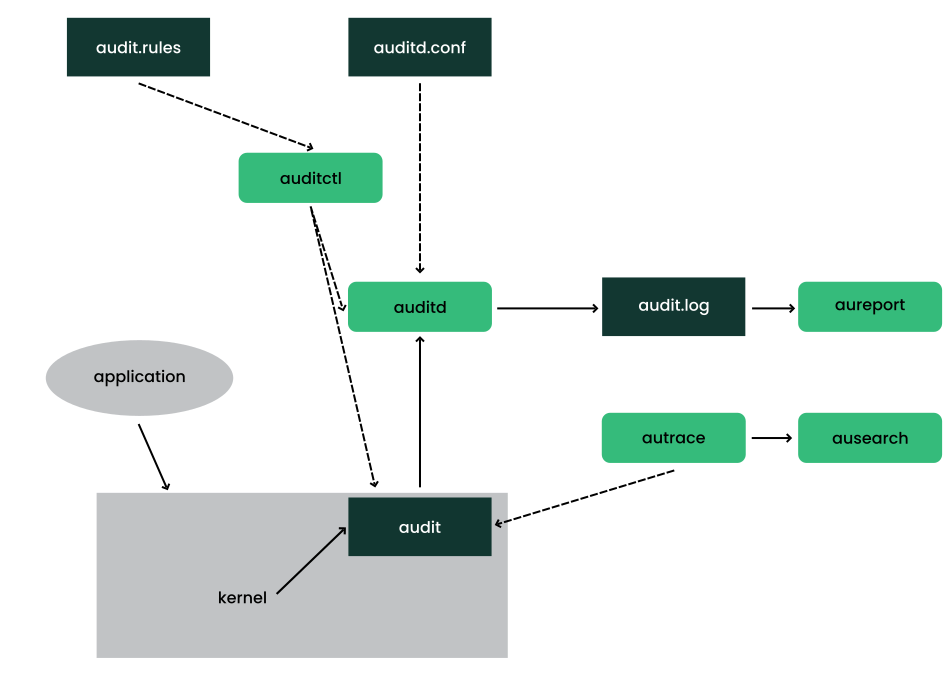
Unlike standard logs, auditd captures system-level activity such as syscalls, file modifications, privilege changes, and command execution. When properly analyzed, it allows you to reconstruct an attacker’s behavior step by step.
Quick Incident Response Checklist
Before diving into raw logs, structure your investigation:
- Define the scope and identify the first suspicious timestamp
- Identify the entry point (login or access vector)
- Track the original AUID (Audit User ID) across privilege changes
- Trace execution events (EXECVE syscalls) tied to that AUID
- Look for persistence mechanisms (SSH keys, cron jobs, system files)
- Check for audit tampering (CONFIG_CHANGE events)
- Correlate findings with firewall, EDR, and system logs
This approach prevents you from getting lost in low-level noise.
Understanding What Audit Logs Actually Record
Audit logs are not just command histories — they are a syscall-level trace of system activity.
Each event includes:
- A unique event ID
- A timestamp
- The executing process
- The syscall involved
- The AUID (original login identity)
The most important concept in forensic analysis is the AUID. It remains constant throughout a session, even if the attacker escalates privileges using sudo or su.
In other words, UID changes — but AUID does not.
That makes it your most reliable tracking anchor.
Step-by-Step Intrusion Reconstruction
Let’s walk through a typical compromise scenario.
Step 1 — Identify the Initial Access Point
Start by locating suspicious login activity around the alert time:
ausearch -m USER_LOGIN -ts 2026-06-29:02:10 -iFrom this output, identify the AUID associated with the session. This is the identity you will track throughout the investigation.
Step 2 — Follow the Attacker’s Activity
Once you have the AUID, reconstruct the full session:
ausearch -ua 1001 -iThis reveals all actions tied to that user session, including activity after privilege escalation.
Example output:
type=EXECVE msg=audit(...): argc=3 a0="curl" a1="-o" a2="payload.sh"This indicates a downloaded payload — a common first step in post-exploitation behavior.
Step 3 — Investigate Persistence Mechanisms
Attackers typically attempt to maintain access. Focus on key system files:
| Target | Why It Matters |
|---|---|
/etc/passwd | User creation or modification |
/etc/shadow | Password hash extraction or modification |
/etc/sudoers | Privilege escalation persistence |
~/.ssh/authorized_keys | SSH backdoor access |
You can query specific file activity using:
ausearch -f /etc/sudoers -iStep 4 — Trace Privilege Escalation
Privilege escalation often leaves a predictable syscall pattern:
execve→ execution ofsudo,pkexec, or exploit binarysetuid→ transition to root (UID 0)chmod/chown→ persistence or privilege manipulation
Even when the attacker becomes root, the original AUID continues to link all actions back to the initial compromise.
Correlating Audit Logs with Other Sources
Audit logs are powerful, but they are not complete in isolation. They become significantly more useful when correlated with:
- Network logs — confirm external connections (e.g., suspicious
curlorwgetactivity) - EDR telemetry — reconstruct full process trees and parent-child relationships
- File integrity monitoring (FIM) — validate whether sensitive files were modified
This cross-correlation turns isolated events into a complete attack narrative.
Common Mistakes During Investigation
1. Following UID Instead of AUID
UID changes after privilege escalation. AUID does not. Always track AUID.
2. Ignoring CONFIG_CHANGE Events
Attackers may attempt to disable auditing:
auditctl -e 0If logs suddenly stop, check:
ausearch -m CONFIG_CHANGEThis may reveal tampering with the audit system itself.
3. Misaligned Timezones
Always verify whether logs are in UTC or local time. Incorrect assumptions can cause you to miss critical events.
Why Audit Logs Matter in Real Incidents
Audit logs provide something other system logs cannot: a forensic reconstruction of intent and behavior.
Instead of asking:
“Did the attacker log in?”
You can answer:
“What exactly did they do after they got in?”
That shift in perspective is what turns audit logs from compliance artifacts into a high-fidelity investigation tool.
Final Thoughts
Linux audit logs are often underused because they appear complex at first glance. But once you understand AUID tracking and syscall-level visibility, they become one of the most powerful tools in incident response.
In a modern intrusion scenario, authentication logs tell you the entry point — audit logs tell you the entire story.
